Monday, 9 June 2025

Transfer Apple Notes from One Mac to Another

How to Move Notes from One Mac to Another Mac Laptop

Why Transfer Apple Notes Between Macs?

Think of Notes as your digital notebook. When you get a new Mac, the last thing you want is to lose the chapters of your old one. Maybe you jot down grocery lists, creative ideas, or important passwords (though we recommend a password manager for that!). Having your Notes with you on the new device ensures a smooth transition.

Transfer Apple Notes from One Mac to Another


What You’ll Need Before You Start

Before we get started, make sure you have:

  • Both Macs nearby

  • A way to transfer files (AirDrop, USB drive, external SSD, or cloud storage)

  • Access to Finder on both Macs

  • The Notes app closed on both machines

Understanding the Notes Storage Location

Apple doesn’t just store Notes in a regular visible folder. They’re tucked away deep in your Library folder — a hidden area where macOS keeps important app data.

The actual path is:

~/Library/Group Containers/group.com.apple.notes/

This is where your Mac hides your Notes files, and that’s where we’re headed.

Step 1: Locate the Notes Folder on the Old Mac

Here’s how to get to it:

  1. Open Finder.

  2. Press Command + Shift + G to open Go to Folder.

  3. Paste this path:

    ~/Library/Group Containers/group.com.apple.notes/
  4. Hit Return.

You’ll see a bunch of files, but we only need three of them.

Step 2: Identify the 3 Key Files to Copy

The files you’re looking for are:

  • NoteStore.sqlite

  • NoteStore.sqlite-shm

  • NoteStore.sqlite-wal

These are the heart of your Notes. Think of them as the pages, bookmarks, and highlights of your digital notebook.

Step 3: Copy Files to a Safe Location (Desktop)

Simply drag and drop the three files onto your desktop. This step is like putting your Notes into a little box, ready for the move.

Make sure the Notes app is closed while doing this — otherwise, the files may not copy correctly.

Step 4: Transfer Files to Your New Mac

Now you have a few choices for getting those files onto the new Mac:

  • AirDrop (fastest and easiest if both Macs are nearby)

  • USB flash drive or external hard drive

  • Cloud storage like Dropbox or iCloud Drive

Move the three files to the desktop of the new Mac, just to keep things tidy.

Step 5: Paste Files in the Right Location

Ready to unpack your Notes on the new machine?

  1. On the new Mac, go to:

    ~/Library/Group Containers/group.com.apple.notes/

    (Use the same Command + Shift + G trick.)

  2. Paste the three files you transferred into this folder. Replace any existing files when prompted.

Step 6: Launch Notes App and Check for Success

Now the magic moment:

  • Open the Notes app on the new Mac.

  • Voila! You should see all your Notes exactly as they were on the old Mac.

If nothing shows up immediately, try restarting your Mac.

Important Precautions to Take

  • Always close the Notes app before copying or pasting these files.

  • Create a backup of the original files on the new Mac in case something goes wrong.

  • Ensure both Macs are running compatible versions of macOS to avoid compatibility issues.

Troubleshooting Common Issues

Nothing is showing up?
Make sure you replaced the correct files and that you’re in the right directory.

Files won’t copy?
Double-check that Notes isn’t open and you have the right permissions.

App crashes?
Delete the new files and try again. Or consider restoring the original files you backed up.

Using iCloud as an Alternative Option

If both Macs are signed in to the same Apple ID and Notes is enabled in iCloud:

  1. Go to System Settings > Apple ID > iCloud > Notes and enable it.

  2. Wait for Notes to sync automatically.

  3. Open Notes on the new Mac — they should be there.

But… this only works if your Notes were already syncing with iCloud before switching.

Manual Backup vs. Cloud Sync: What’s Better?

Manual transfer gives you more control and works even without internet.
iCloud sync is convenient and automatic, but relies on active sync and internet access.

Think of it like choosing between mailing a package yourself vs. using a courier service.

Conclusion and Final Thoughts

Transferring your Notes from one Mac to another doesn’t have to be complicated. With just three files and a bit of attention to detail, you can carry your entire digital notebook over to your new machine.

Whether you’re upgrading, replacing, or just starting fresh, keeping your notes safe ensures continuity and peace of mind.

FAQs

1. Can I move Apple Notes without using iCloud?
Yes! By copying the three NoteStore files from one Mac to another, you can transfer Notes manually.

2. Do I need to use Terminal or any special commands?
Nope — everything can be done through Finder using basic copy-paste functions.

3. What happens if I forget to close Notes before copying the files?
You might end up with corrupted or incomplete files. Always close the Notes app first.

4. Can I transfer Notes between Macs with different macOS versions?
It’s best to have the same or close versions of macOS. Major version differences might cause issues.

5. Is this method safe to use for work-related or sensitive Notes?
Yes, but always back up your files first, and consider encryption if the content is sensitive.

Tuesday, 2 July 2024

mysql commands to learn basic sql commands on terminal


On your mac terminal to open your mysql use the below command

firstname.lastname@MRMAcNAME ~ % mysql -u root -A

Welcome to the MariaDB monitor.  Commands end with ; or \g.

Your MariaDB connection id is 1277

Server version: 10.4.33-MariaDB Homebrew

Copyright (c) 2000, 2018, Oracle, MariaDB Corporation Ab and others.

Type 'help;' or '\h' for help. Type '\c' to clear the current input statement.

MariaDB [(none)]> 

=======================================================

To list databases

MariaDB [(none)]> show databases;

+--------------------+

| Database           |

+--------------------+

| database1   |

| master       |

| information_schema |          |

| mysql              |            |

+--------------------+

7 rows in set (0.004 sec)

MariaDB [(none)]> 

============================================

To create a new database

MariaDB [(none)]> create database testdemo;

Query OK, 1 row affected (0.003 sec)

============================================

To use the database 

MariaDB [(none)]> use testdemo;

Database changed

============================================

To list the tables

MariaDB [testdemo]> show tables;

Empty set (0.001 sec)

============================================

To delete a database

MariaDB [(none)]> drop database testdemo;

Query OK, 0 rows affected (0.022 sec)

============================================

To exit from the Mysql server

MariaDB [testdemo]> exit;

Bye

firstname.lastname@MRMAcNAME ~ % 

Can't connect to local MySQL server through socket '/tmp/mysql.sock'

 If you see this error message while trying to connect to a local MySQL Server:

ERROR 2002 (HY000): Can't connect to local MySQL server through socket '/var/lib/mysql/mysql.sock'

It means either the MySQL server is not installed/running, or the file mysql.sock doesn’t exist in /var/lib/mysql/.

There are a couple of solutions for this error. 

On your command prompt or terminal try to stop the server first by running below command

Mysql.server stop

And after successfully stopped

Run below command to start the mysql server

Mysql.server start

Saturday, 24 June 2017

what is the difference between public static final and public final static

what is the difference between public static final and public final static

No difference at all

They are the same. The order of modifiers is not significant. And note that the same rule applies in all contexts where modifiers are used in Java.

However, most Java style guides recommend/mandate the same specific order for the modifiers.
In this case, it is public static final.


private static final String API_RTN_ERROR= "1";
private final static String API_RTN_ERROR= "1";
static private final String API_RTN_ERROR= "1";
static final private String API_RTN_ERROR= "1";
final static private String API_RTN_ERROR= "1";
final private static String API_RTN_ERROR= "1";

even all above are same the position of first three is intercangeable.

Does it differ for private or public?
No, you can use any order in private and public. Just difference is private variables will not be accessible outside of class directly.


https://stackoverflow.com/questions/11219556/difference-between-final-static-and-static-final

what is the meaning of public static final string SOME_VARIABLE = "variable text"

what is the meaning of public static final string SOME_VARIABLE = "variable text"

final indicates that the value of the variable won't change - in other words, a variable who's value can't be modified after it is declared.

Use public final static String when you want to create a String that:

belongs to the class (static: no instance necessary to use it), and that
won't change (final), for instance when you want to define a String constant that will be available to all instances of the class, and to other objects using the class.


Similarly:

public static final int ERROR_CODE = 54654;
It isn't required to use final, but it keeps a constant from being changed inadvertently during program execution, and serves as an indicator that the variable is a constant.

Even if the constant will only be used - read - in the current class and/or in only one place, it's good practice to declare all constants as final: it's clearer, and during the lifetime of the code the constant may end up being used in more than one place.

Also, you may access the value of a public static string w/o having an instance of a class.

static means that the object will only be created once, and does not have an instance object containing it. The way you have written is best used when you have something that is common for all objects of the class and will never change. It even could be used without creating an object at all.

Usually it's best to use final when you expect it to be final so that the compiler will enforce that rule and you know for sure. static ensures that you don't waste memory creating many of the same thing if it will be the same value for all objects.

public makes it accessible across other classes.


what-is-difference-between-public static final and public final static

Tuesday, 5 July 2016

How to add ISTQB certification to linked in profile

Here follow these steps to add any certification as below steps so that

First click on your Profile in Linked in

Just below to your details there is a option "Add a section to your profile" In that block click on "View details"

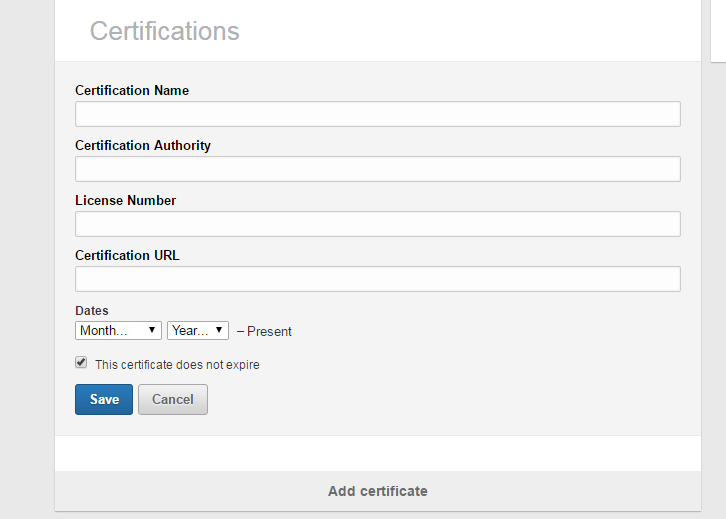
 Click on View more


Select  certifications
Now fill details


Click on Save button so that it will appear as below on your linked profile.


How to connect to shared drive on mac

Step 1: First please check whether you have connected to your company network or not ? if not connect to your LAN or internet network and in my company scenario I have to connect to blue cable to my mac laptop.

Step2:  Click on Finder icon  or by minimising all browsers for windows come into Desktop

Step 3: From keyboard click Cmd  + K  or In the Finder , Choose Go > “Connect to Server”

Step 4: It will open “Connect to Sever” window

Step 5: On the “Server address” give your shared drive address

 machinename/foldername1/foldername2

and click on “Connect” button  It will ask for User id and password  please give your system user id and password
it will generate as below
smb://machinename/foldername1/foldername2

Just in case if you need to keep as a further reference click on + icon


Just in case if you want to remove even you can remove by clicking on Remove button.

More details you can get here

https://support.apple.com/kb/ph10644?locale=en_US

Monday, 26 October 2015

package org.junit does not exist

package org.junit does not exist

Your Test class might be located in src/main/java.
Also the value of the "scope" element in the POM for JUnit was "test", although that is how it is supposed to be.
The problem was that You had been sloppy when creating the test class in Eclipse that is
resulting in it being created in src/main/java insted of src/test/java.

So put your .java class in src/test/java


And in pom.xml just add  <scope>test</scope> for junit dependency if it is already existed.


<dependency>
  <groupId>junit</groupId>
  <artifactId>junit</artifactId>
  <version>4.11</version>
  <scope>test</scope>
</dependency>

Wednesday, 21 October 2015

How to clear passwords in firefox

Some times even though we clear cookies passwords saves in firefox browser because on firefox passwords stores on security tab. to clear those passwords we have to navigate to the below path .

On firefox Click on right corner tab and click on Preferences it navigates to 

about:preferences

 Security-> Saved Passwords

then click on Remove all button

about:preferences


Security-> Saved Passwords

How to test your website for different countries just by setting proxy ip address on browser

If you are test your website for different countries just by sitting in UK if you want to see how your site behaves to USA clients. You can test  by setting proxy in your browser.


 Fox proxy chrome type in google for plug in  and install

 Open browser on right side you see blue icon click on that 
It should open this extension


 click on Options

 Then click on Add new proxy


 Under Proxy details tab


 Enter your country ip address Host or IP Address
 for example USA IP address 69.147.161.182:8080
 Ip address you can get from here

http://www.samair.ru/proxy-by-country/United-States-01.htm


To choose different country ip 

http://www.samair.ru/proxy/


If you want to give name to the proxy whatever you have created 


After that click on SAVE button

Open a browser and click on right side blue icon


Enable to click on your proxy 

Now clear all your cookies and open new tab of browser
Or else you can open site in 

incognito tab 


now search for www.google.com .. It should open .com site since we setup USA proxy ip address .

As a results you can sit in any country for example in UK but if you want to see how your site behaves to USA clients 

ANDROID_HOME not set appium java

Where the Android-SDK is installed depends on how you installed it. If you downloaded the SDK through their website and then dragged/dropped the Application to your Applications folder, it's most likely in /Applications/ADT/sdk (as it is in your case).

If you installed it using Homebrew (brew install android-sdk), then it's located here:

/usr/yourusername/android-sdks


env | grep ANDROID_HOME on the terminal that is working. If the file is already existed This should give something like
ANDROID_HOME=/usr/yourusername/android-sdks


If not they do changes on Bash file

Type below command to check whether bash_profile existed or not
ls -1 ~/.bash_profile
 
If it is not existed then it message throws as “No such file or directory”
touch ~/.bash_profile 


now open .bash_profile, if you dont have one just create one
vi ~/.bash_profile
Add the following:

esc + i   it allow to enter data into vim editor

#set ANDROID_HOME

ANDROID_HOME=/usr/yourusername/android-sdks

export ANDROID_HOME


Once you have this set, you need to add this to the PATH environment variable

export PATH=$PATH:$ANDROID_HOME/tools:$ANDROID_HOME/platform-tools

Now save the file  by pressing below commands esc + :wq  
And after that to execute bash file 
 source ~/.bash_profile
 
 Now if you type this command it should show path
 
 echo $ANDROID_HOME

Tuesday, 17 February 2015

Free responsive website development help video tutorials


Free responsive website development help video tutorials

https://developers.google.com/web/fundamentals/getting-started/?hl=en


https://www.udacity.com/wiki/cs256

Thursday, 29 January 2015

How to setup or run automation scripts on chrome browser for Selenium automation testing


How to setup or run automation scripts on chrome browser for Selenium automation testing 

Here I am giving some example to control browsers from config.properties file as well.

Step 1:Create a folder name config under your project 
Step 2: Create a file name call it as config.properties file

Step 3: paste this  
#### Control browsers from here 'Firefox, Chrome, Internet Explorer’ whenever you want to change browser you can change here directly.
BROWSER=chrome
Step 4: 
Download Chrome driver from this page


or   directly from here

Create a folder in your selenium project as Chrome driver and place this Chrome  .exe file in that folder

And now right click on that .exe take path.

Example path like this :     projectname//src//chromedriver//chromedriver


Step 5: Create a java file as below


import java.io.FileInputStream;
import java.io.InputStream;
import java.util.PropertyResourceBundle;

import java.util.ResourceBundle;
import org.openqa.selenium.By;
import org.openqa.selenium.WebDriver;
import org.openqa.selenium.WebElement;
import org.openqa.selenium.chrome.ChromeDriver;

public class DriverStart 
{
public static WebDriver driver;
public static String BROWSER = null;
public static String USERDIR = System.getProperty("user.dir”);
public static ResourceBundle bundle = null;
public static InputStream initPropertyFile = null;
public static String PROPERTY_PATH = null;
public JavascriptExecutor jse;


PROPERTY_PATH = USERDIR
+ "/Config/config.properties";
if (initPropertyFile == null) {
initPropertyFile = new FileInputStream(PROPERTY_PATH);  
}
if (bundle == null) {
bundle = new PropertyResourceBundle(initPropertyFile);
}

BROWSER = bundle.getString("BROWSER");


if (BROWSER.equalsIgnoreCase("chrome")) {
File file = new File(“Chrome drive .exe file path");
System.setProperty("webdriver.chrome.driver", file.getAbsolutePath());
driver = new ChromeDriver();
builder = new Actions(driver); 
driver.manage().timeouts().implicitlyWait(10,TimeUnit.SECONDS );

                                       jse = (JavascriptExecutor) driver;

 }


// Here you can call Firefox..
if (BROWSER.equalsIgnoreCase("firefox")) {

driver = new FirefoxDriver();
builder = new Actions(driver); 
driver.manage().timeouts().implicitlyWait(10,TimeUnit.SECONDS );
jse = (JavascriptExecutor) driver;

}

}


Tuesday, 27 January 2015

How to automate scroll up or down button in selenium java

How to automate scroll up or down button in selenium java


WebDriver driver = new FirefoxDriver();
JavascriptExecutor jse = (JavascriptExecutor)driver;
jse.executeScript("window.scrollBy(0,250)", "");
or, you can do as follows:

jse.executeScript("scroll(0, 250);”);

If you want to do up use this script.
 For scroll up: jse.executeScript("scroll(250, 0)");

Thursday, 22 January 2015

How to create a dynamic email id in selenium cucumber java in automation testing


How to create a dynamic email id in selenium cucumber java in automation testing

public static final DateFormat EMAIL_ DATE_FORMAT = new SimpleDateFormat("HHmmss-dd-MMM-yyyy”);
This method you can create in superclass that class name is Utils
  public static String getUniqueEmailName() {
                    return EMAIL_ DATE_FORMAT.format(new Date()) + “@hotmail.com";
    }

And then in sub class you can call like this… 
public void Click(String Value, Utils utils) throws Exception {

public static String genEmailEdited;
genEmailEdited = superclass or utils.getUniqueEmailName();
System.out.println("the new edited email is --------->" + genEmailEdited);

driver.findElement(By.xpath(xpathcomehere )).sendKeys(genEmailEdited);
}
OR


import java.text.Format;
import java.text.SimpleDateFormat;
import java.util.Date;

public class Main {
  public static void main(String[] argv) throws Exception {
    Format formatter = new SimpleDateFormat("EEE, dd/MM/yyyy");
    String today = formatter.format(new Date());
    System.out.println("Today : " + today);

  }
}

Friday, 16 January 2015

How to verify whether the image is present or not on Selenium java cucubmer

How to verify whether the image is present or not on Selenium java cucubmer

if(driver.findElement(By.xpath("xpath of
image")).getAttribute("src").contains("image file name present in the html
source"));

it just verifies that the given image link present in the html source or
not. To verify that whether the image is displayed or not, you try to use
isDisplayed() command.

Wednesday, 7 January 2015

java.lang.ClassNotFoundException: com.google.common.net.MediaType


Solution

You need Google Guava in your classpath by the looks of things. This is where the class com.google.common.base.Function lives.

Just in case if you are using maven setup include this dependency in pom.xml

<dependency>
<groupId>com.google.guava</groupId>
<artifactId>guava</artifactId>
<version>18.0</version>
</dependency>


Error looks as below:


java.lang.NoClassDefFoundError: com/google/common/net/MediaType
at org.openqa.selenium.remote.http.JsonHttpCommandCodec.encode(JsonHttpCommandCodec.java:197)
at org.openqa.selenium.remote.HttpCommandExecutor.execute(HttpCommandExecutor.java:163)
at org.openqa.selenium.remote.service.DriverCommandExecutor.execute(DriverCommandExecutor.java:66)
at org.openqa.selenium.remote.RemoteWebDriver.execute(RemoteWebDriver.java:572)
at org.openqa.selenium.remote.RemoteWebDriver.startSession(RemoteWebDriver.java:240)
at org.openqa.selenium.remote.RemoteWebDriver.<init>(RemoteWebDriver.java:126)
at org.openqa.selenium.remote.RemoteWebDriver.<init>(RemoteWebDriver.java:139)
at org.openqa.selenium.chrome.ChromeDriver.<init>(ChromeDriver.java:171)
at org.openqa.selenium.chrome.ChromeDriver.<init>(ChromeDriver.java:160)
at org.openqa.selenium.chrome.ChromeDriver.<init>(ChromeDriver.java:117)
at skeleton.Utils.init(Utils.java:127)
at skeleton.Stepdefs.i_wait_hour(Stepdefs.java:27)
at ?.When I wait 1 hour(skeleton/belly.feature:5)
Caused by: java.lang.ClassNotFoundException: com.google.common.net.MediaType
at java.net.URLClassLoader$1.run(URLClassLoader.java:202)
at java.security.AccessController.doPrivileged(Native Method)
at java.net.URLClassLoader.findClass(URLClassLoader.java:190)
at java.lang.ClassLoader.loadClass(ClassLoader.java:306)
at sun.misc.Launcher$AppClassLoader.loadClass(Launcher.java:301)
at java.lang.ClassLoader.loadClass(ClassLoader.java:247)
at org.openqa.selenium.remote.http.JsonHttpCommandCodec.encode(JsonHttpCommandCodec.java:197)
at org.openqa.selenium.remote.HttpCommandExecutor.execute(HttpCommandExecutor.java:163)
at org.openqa.selenium.remote.service.DriverCommandExecutor.execute(DriverCommandExecutor.java:66)
at org.openqa.selenium.remote.RemoteWebDriver.execute(RemoteWebDriver.java:572)
at org.openqa.selenium.remote.RemoteWebDriver.startSession(RemoteWebDriver.java:240)
at org.openqa.selenium.remote.RemoteWebDriver.<init>(RemoteWebDriver.java:126)
at org.openqa.selenium.remote.RemoteWebDriver.<init>(RemoteWebDriver.java:139)
at org.openqa.selenium.chrome.ChromeDriver.<init>(ChromeDriver.java:171)
at org.openqa.selenium.chrome.ChromeDriver.<init>(ChromeDriver.java:160)
at org.openqa.selenium.chrome.ChromeDriver.<init>(ChromeDriver.java:117)
at skeleton.Utils.init(Utils.java:127)
at skeleton.Stepdefs.i_wait_hour(Stepdefs.java:27)
at sun.reflect.NativeMethodAccessorImpl.invoke0(Native Method)
at sun.reflect.NativeMethodAccessorImpl.invoke(NativeMethodAccessorImpl.java:39)
at sun.reflect.DelegatingMethodAccessorImpl.invoke(DelegatingMethodAccessorImpl.java:25)
at java.lang.reflect.Method.invoke(Method.java:597)
at cucumber.runtime.Utils$1.call(Utils.java:34)
at cucumber.runtime.Timeout.timeout(Timeout.java:13)
at cucumber.runtime.Utils.invoke(Utils.java:30)
at cucumber.runtime.java.JavaStepDefinition.execute(JavaStepDefinition.java:35)
at cucumber.runtime.StepDefinitionMatch.runStep(StepDefinitionMatch.java:37)
at cucumber.runtime.Runtime.runStep(Runtime.java:298)
at cucumber.runtime.model.StepContainer.runStep(StepContainer.java:44)
at cucumber.runtime.model.StepContainer.runSteps(StepContainer.java:39)
at cucumber.runtime.model.CucumberScenario.run(CucumberScenario.java:48)
at cucumber.runtime.junit.ExecutionUnitRunner.run(ExecutionUnitRunner.java:91)
at cucumber.runtime.junit.FeatureRunner.runChild(FeatureRunner.java:63)
at cucumber.runtime.junit.FeatureRunner.runChild(FeatureRunner.java:18)
at org.junit.runners.ParentRunner$3.run(ParentRunner.java:238)
at org.junit.runners.ParentRunner$1.schedule(ParentRunner.java:63)
at org.junit.runners.ParentRunner.runChildren(ParentRunner.java:236)
at org.junit.runners.ParentRunner.access$000(ParentRunner.java:53)

Monday, 5 January 2015

BDD cucumber example

BDD cucumber example
http://aslakhellesoy.com/post/20006051268/cucumber-jvm-1-0-0

https://github.com/cucumber/cucumber-java-skeleton

https://github.com/cucumber/cucumber-java-skeleton/releases

The best explanation

http://www.srccodes.com/p/article/48/cucumber-test-behavior-driven-development-bdd-feature-step-runner-glue-gherkin-data-table-scenario-given-when-then

BDD JVM Cucumber with masterthoughts reporting pom.xml workable

<project xmlns="http://maven.apache.org/POM/4.0.0" xmlns:xsi="http://www.w3.org/2001/XMLSchema-instance"
    xsi:schemaLocation="http://maven.apache.org/POM/4.0.0 http://maven.apache.org/xsd/maven-4.0.0.xsd">
    <modelVersion>4.0.0</modelVersion>
    <groupId>org.stag.simplecucumber</groupId>
    <artifactId>simple-cucumber-jvm</artifactId>
    <version>0.0.1-SNAPSHOT</version>
    <properties>
        <cucumber-jvm.version>1.0.11</cucumber-jvm.version>
        <selenium.version>2.44.0</selenium.version>
        <junit.version>4.11</junit.version>
        <picocontainer.version>2.13.6</picocontainer.version>
        <cucumber-reporting.version>0.0.17</cucumber-reporting.version>
    </properties>
    
    
    <repositories>
       <repository>
           <id>repo.bodar.com</id>
           <url>http://repo.bodar.com</url>
       </repository>
       <repository>
                <id>sonatype-releases</id>
                <url>https://oss.sonatype.org/content/repositories/releases/</url>
            </repository>
   </repositories>

  
    <dependencies>

        <dependency>
            <groupId>info.cukes</groupId>
            <artifactId>cucumber-picocontainer</artifactId>
            <version>${cucumber-jvm.version}</version>
            <scope>test</scope>
        </dependency>
        
         <dependency>
           <groupId>com.googlecode.totallylazy</groupId>
           <artifactId>totallylazy</artifactId>
           <version>1077</version>
   </dependency>
         
             <dependency>
            <groupId>info.cukes</groupId>
            <artifactId>cucumber-java</artifactId>
            <version>1.2.0</version>
            <scope>test</scope>
        </dependency>
   <dependency>
            <groupId>info.cukes</groupId>
            <artifactId>cucumber-junit</artifactId>
            <version>1.2.0</version>
            <scope>test</scope>
        </dependency>
        <dependency>
            <groupId>junit</groupId>
            <artifactId>junit</artifactId>
            <version>${junit.version}</version>
        </dependency>
        <dependency>
            <groupId>org.picocontainer</groupId>
            <artifactId>picocontainer</artifactId>
            <version>${picocontainer.version}</version>
        </dependency>
        <dependency>
            <groupId>org.seleniumhq.selenium</groupId>
            <artifactId>selenium-java</artifactId>
            <version>${selenium.version}</version>
        </dependency>
      <dependency>
<groupId>com.google.guava</groupId>
<artifactId>guava</artifactId>
<version>18.0</version>
</dependency>
      
        <dependency>
            <groupId>net.masterthought</groupId>
            <artifactId>cucumber-reporting</artifactId>
            <version>${cucumber-reporting.version}</version>
        </dependency>
    </dependencies>

    <build>
        <plugins>
            <plugin>
                <groupId>org.apache.maven.plugins</groupId>
                <artifactId>maven-surefire-plugin</artifactId>
                <version>2.10</version>
                <configuration>
                    <skipTests>false</skipTests>
                    <testFailureIgnore>true</testFailureIgnore>
                </configuration>
            </plugin>

            <plugin>
                <groupId>org.apache.maven.plugins</groupId>
                <artifactId>maven-surefire-plugin</artifactId>
                <configuration>
                    <testFailureIgnore>true</testFailureIgnore>
                </configuration>
            </plugin>
            <plugin>
                <groupId>net.masterthought</groupId>
                <artifactId>maven-cucumber-reporting</artifactId>
                <version>0.0.5</version>
                <executions>
                    <execution>
                        <id>execution</id>
                        <phase>verify</phase>
                        <goals>
                            <goal>generate</goal>
                        </goals>
                        <configuration>
                            <projectName>cucumber-jvm-example</projectName>
                            <outputDirectory>${project.build.directory}/cucumber-html-reports</outputDirectory>
                            <cucumberOutput>${project.build.directory}/cucumber.json</cucumberOutput>
                
                            <enableFlashCharts>false</enableFlashCharts>
                        </configuration>
                    </execution>
                </executions>
            </plugin>
             
        </plugins>
    </build>


</project>